Free YouTube video summarizer
Paste a YouTube link. Get a structured AI summary and the full transcript, free, with no signup.
-
A structured summary
Sections, key points and takeaways, not a wall of text.
-
The full transcript
Every caption, searchable and grouped by time.
-
A page you can share
One link for your notes, a group chat or a class.
This tool gives you the summary. LunaNotes gives you the rest.
LunaNotes is an AI note-taking app: bring a video, a PDF, an audio file, a meeting or your own writing, and it becomes a note you can edit, study, revise and ask questions of. The free tool stops where that work starts.
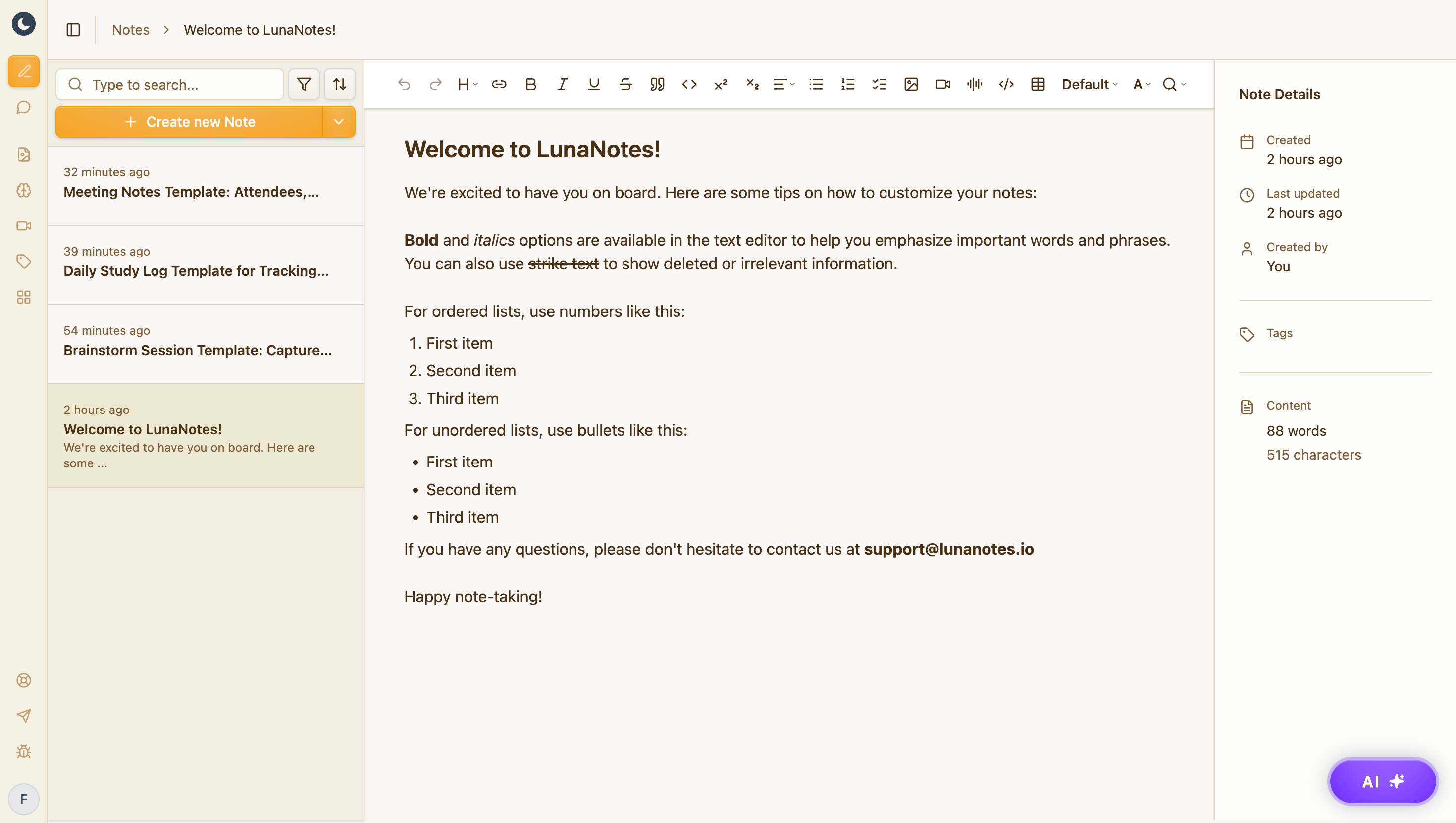
A structured note, not a wall of text
Headings, hierarchy, and the details that matter — editable the moment it lands, and searchable forever after.

A diagram of how it connects
Turn the note into a concept map or flowchart. The relationships prose hides become obvious.

Flashcards that test your material
Generated from your own note, so revision starts from something you've already processed.
Free plan: 1,000 AI credits a month, 5 diagrams, 5 flashcard decks. No credit card.
Frequently asked questions
How do I summarize a YouTube video?
Copy the video's link from the address bar or the Share button, paste it above and press Summarize. A minute or two later you get a summary with key points, plus the full transcript, on a page you can share.
How do I get the transcript of a YouTube video?
Paste the link above. The result page includes the video's complete transcript next to the summary, taken from its captions, so you can read or search it without playing the video.
Can I get the summary in another language?
Yes. Pick a language under the link and the summary is written in it. There are 12 to choose from, including Spanish, French, German, Portuguese, Japanese and Chinese. The transcript stays in the language the video was spoken in.
How long does it take?
Usually under two minutes. If someone has already summarized the same video, you go straight to the result.
Is it really free? Do I need to sign up?
Yes, it's free, and no. Paste a link and you get the summary without an account, an email address or a credit card.
Which videos does it work with?
Any public YouTube video that has captions, either the creator's own or YouTube's auto-generated ones. Private, members-only and age-restricted videos can't be read, and a video with no captions at all has nothing to work from.
What is LunaNotes?
LunaNotes is an AI note-taking app. You bring a video, PDF, audio file, meeting or your own writing, and it gives you an editable note plus diagrams, flashcards and an AI chat built from it. This tool runs one step of that on its own. The free plan includes 1,000 AI credits a month, with no credit card.
Can I edit the summary?
The page here is a fixed public result. To edit it, open the same video in a free LunaNotes account. The summary arrives as a note you can rewrite and turn into a diagram or flashcards.
Popular summaries
 A Comprehensive Guide to Using Stable Diffusion Forge UI Explore the Stable Diffusion Forge UI, customizable settings, models, and more to enhance your image generation experience.
 Kolonyalismo at Imperyalismo: Ang Kasaysayan ng Pagsakop sa Pilipinas Tuklasin ang kasaysayan ng kolonyalismo at imperyalismo sa Pilipinas sa pamamagitan ni Ferdinand Magellan.
 Mastering Inpainting with Stable Diffusion: Fix Mistakes and Enhance Your Images Learn to fix mistakes and enhance images with Stable Diffusion's inpainting features effectively.
 Pamamaraan at Patakarang Kolonyal ng mga Espanyol sa Pilipinas Tuklasin ang mga pamamaraan at patakaran ng mga Espanyol sa Pilipinas, at ang epekto nito sa mga Pilipino.
 How to Install and Configure Forge: A New Stable Diffusion Web UI Learn to install and configure the new Forge web UI for Stable Diffusion, with tips on models and settings.
- Pamaraan at Patakarang Kolonyal ng mga Espanyol sa Pilipinas Tuklasin ang mga pamamaraan at patakarang kolonyal ng mga Espanyol sa Pilipinas at ang mga epekto nito sa mga Pilipino.
Latest summaries
 SSC CGL 2025: Modern History Masterclass 100 MCQs for GS Boost your SSC CGL GS preparation with this comprehensive modern history session covering 100 high-level MCQs. Master key events like the 1857 Revolt, Gandhi's Satyagrahas, and constitutional developments for exam success.
 धातु विज्ञान वन शॉट: मेटल और नॉन-मेटल के गुण और रासायनिक अभिक्रियाएँ यह वीडियो मेटलर्जी के पूरे चैप्टर का एक व्यापक वन-शॉट रिवीजन है, जो प्रीलिम्स और बोर्ड एग्जाम के लिए पर्याप्त है। इसमें धातुओं और अधातुओं के भौतिक एवं रासायनिक गुणों, ऑक्सीजन, जल और अम्लों के साथ अभिक्रियाओं, और रिएक्टिविटी सीरीज को विस्तार से समझाया गया है।
 Remember Everything You Read: The PACER Learning System Stop wasting time on passive reading. This video breaks learning into two essential stages—Consumption and Digestion—and introduces the PACER system to categorize any information you read. Learn the targeted process for each type (Procedural, Analogous, Conceptual, Evidence, Reference) to dramatically boost retention and application.
 ETF क्या है? म्यूचुअल फंड बनाम ETF: पूरी गाइड, फायदे, नुकसान और निवेश का तरीका इस वीडियो में जानें कि ETF क्या है, यह कैसे काम करता है और म्यूचुअल फंड से इसका अंतर क्या है। साथ ही, विभिन्न प्रकार के ETF (इक्विटी, डेट, गोल्ड, सेक्टोरल, इंटरनेशनल) के बारे में जानें और भारत बनाम अमेरिका के ETF बाजार की तुलना देखें। व्यावहारिक रूप से Groww ऐप पर ETF में निवेश करना सीखें और शुरुआती निवेशकों के लिए जरूरी टिप्स पाएं।
 Atonalismo Libre: Análisis del Pierrot Lunaire de Schönberg Exploramos el atonalismo libre schönbergiano a través de la pieza "Nacht" (Noche) de Pierrot Lunaire, Op. 21. Este análisis detallado desglosa la técnica compositiva del motivo (Grundgestalt), las mutaciones entre intervalos y el uso de la forma pasacalle en una de las obras más representativas del expresionismo musical.
 How Large Language Models Actually Predict the Next Word This video provides a clear, step-by-step explanation of how large language models (LLMs) work, from the core concept of next-word prediction to the intricacies of transformers and training at scale. Discover how GPT-3 and similar models are built, how they learn from trillions of text examples, and why their outputs can feel so natural and useful.
More free tools
Same idea, different output. All free, all built on LunaNotes.
- AI notes generator Paste text or upload a PDF and get structured study notes: headings, key terms and takeaways. Nothing you paste is published.
- Timestamps & chapters Break a video into chapters with clickable timestamps and a short description of what happens in each one.
- Fact checker Pull the factual claims out of a video, check each one, and get a 0–100 credibility score with the reasoning shown.
- Subtitle downloader Download a video's captions as SRT, VTT or plain text — the timed subtitle file, ready to edit or re-use.